In the Work
The 10 email flows every ecommerce brand needs
12 min read

An email flow is an automated series of emails that sends when a shopper takes a specific action, such as joining a list, leaving a cart, or placing an order. A campaign goes to a list on a date you choose. A flow goes to one person at the moment their behavior calls for it.
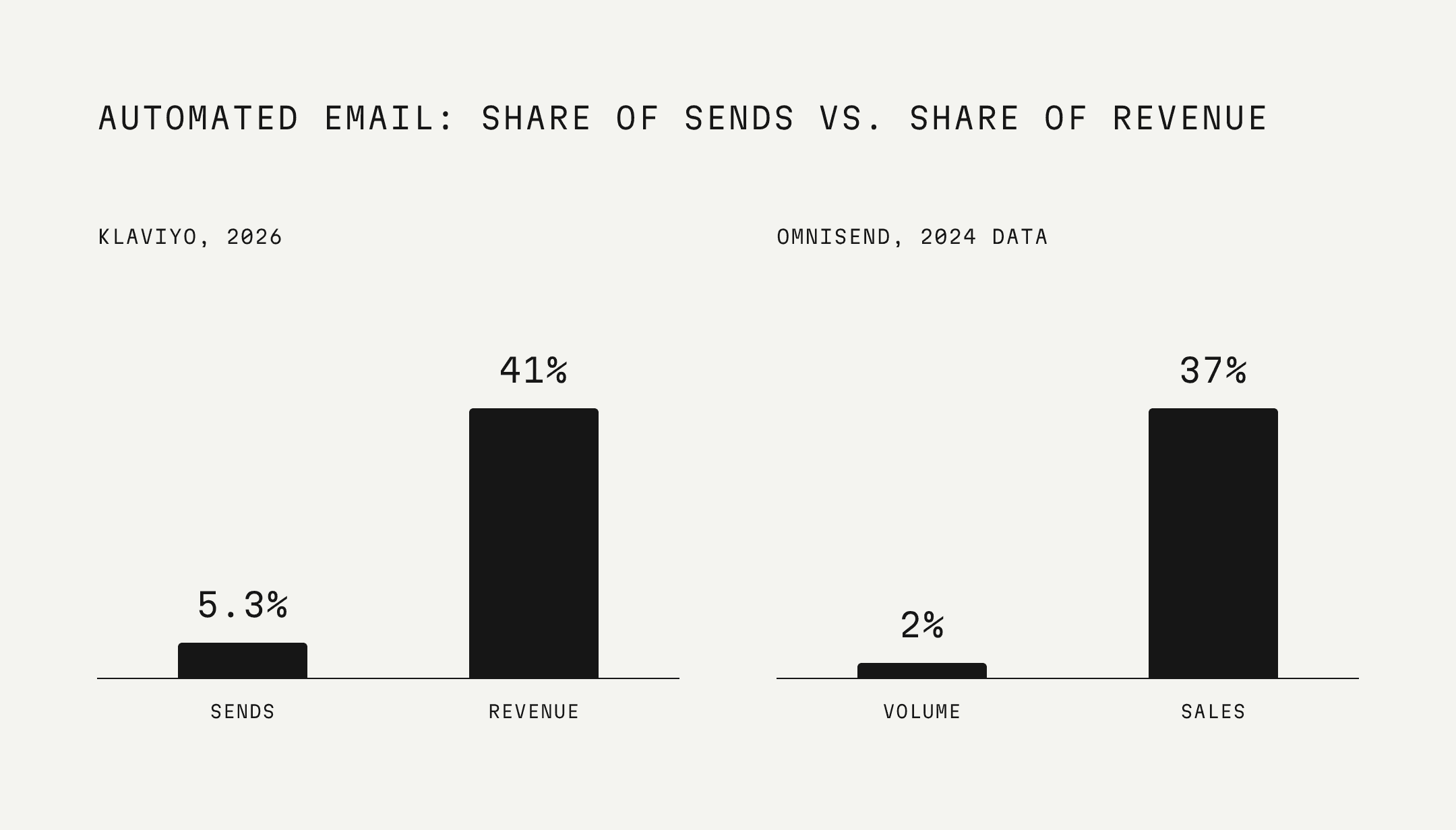
That timing is why flows earn so much. In Klaviyo’s 2026 email benchmarks, flows made up 5.3% of email sends and nearly 41% of email revenue. Omnisend’s 2025 ecommerce marketing report, which analyzed about 24 billion emails sent in 2024, found the same pattern: automated emails drove 37% of email sales from 2% of email volume.
In our last piece on flows, we covered the seven we build first and the one rule most brands get wrong. This guide covers all ten flows a full program runs, grouped by the job each one does.
The 10 email flows, at a glance
Welcome flow
Browse abandonment flow
Cart and checkout abandonment flows
Back in stock flow
Post-purchase flow
Cross-sell flow
Replenishment flow
VIP and loyalty flow
Winback flow
Sunset flow
The first four get the first order. The next three earn the second. VIP keeps the best buyers. Winback and sunset decide who comes back and who comes off the list.

Every flow runs on the same four rules: a trigger that starts it, timing between emails, filters that decide who gets each email, and an exit that stops it. For each flow below, we list all four, the numbers behind it, and where we see it break most often in the accounts we audit.
Which email flows make the most money?
Abandoned cart flows earn the most per email. In Klaviyo’s 2026 Omnichannel Benchmark Report, drawn from more than 110,000 brands, abandoned cart emails averaged $6.77 in revenue per recipient. Welcome emails averaged $5.75, browse abandonment $2.08, post-purchase $1.80, and winback $0.82.

Revenue per email isn’t the whole picture. Omnisend found that abandoned cart, welcome, and browse abandonment emails together produced 87% of all automated orders. Those three flows are where most automation revenue starts. The flows lower on the chart do different work: they protect the second order, the margin, and the list itself.
Part 1: Get the first order
1. Welcome flow
A welcome flow is the series of emails a new subscriber receives after joining your list. Its job is to turn a sign-up into a first order while interest is at its highest.
The numbers: Welcome emails average $5.75 in revenue per recipient and a 6.5% click rate, the highest average click rate of any flow in Klaviyo’s 2026 data. The top 10% of brands earn $13.27 per recipient. Omnisend found that one in two people who click a welcome or abandoned cart email go on to buy.
Why it works: Someone who just signed up asked to hear from you. That is the most attention they will give a brand, and the welcome flow is the only email that reaches them in that window.
Trigger: joins your email list
Filter: has never placed an order
Timing: first email immediately, then one to two days between emails
Emails: three to five
Exit: places a first order
What to send: the sign-up offer first, then the brand story, bestsellers, social proof, and a final reminder before the offer expires. Each email should have one job.
Where it breaks: no buyer exit. Someone who buys from the first email keeps getting emails asking them to make a first purchase. In one audit, that single missing rule left the last four emails in a welcome flow earning between $0 and $38 each while collecting unsubscribes. We broke that audit down here.
2. Browse abandonment flow
A browse abandonment flow emails a shopper who viewed a product but didn’t add it to their cart. It brings them back to the exact product they looked at.
The numbers: Browse abandonment emails average $2.08 per recipient and a 5.6% click rate in Klaviyo’s 2026 data. That’s lower than cart emails because the shopper is earlier in the decision. Together with welcome and cart flows, it’s part of the 87% of automated orders Omnisend attributes to those three flows.
Why it works: A product view is the clearest signal of interest a brand gets before the cart. Showing that product again, with reviews and details, answers the question that made them leave.
Trigger: views a product
Filter: hasn’t added to cart, started checkout, or ordered since; hasn’t been in this flow in the last 30 days
Timing: first email about 45 minutes after the visit, the second a day or two later
Emails: two
Exit: adds to cart, starts checkout, or places an order
What to send: the product they viewed, reviews from people who bought it, and similar products. Hold the discount. A browser hasn’t shown enough intent to need one.
A lighter version: a site abandonment flow catches people who visited but viewed no product. One email with bestsellers is enough.
Where it breaks: the email shows a generic bestseller grid instead of the product they viewed. That throws away the one piece of data this flow runs on, and relevance is how shoppers notice value.
3. Cart and checkout abandonment flows
A cart abandonment flow emails shoppers who added a product to their cart and left. A checkout abandonment flow emails shoppers who started checkout and left. Build them as two separate flows, because someone who reached checkout is closer to buying.
The numbers: Abandoned cart emails earn the most of any flow: $6.77 per recipient on average and $13.70 for the top 10% of brands, per Klaviyo. Their average click rate is 6.0%.
Why it works: The shopper chose a product and nearly paid. The reason they left is often simple: shipping cost, a question about the product, or a distraction.
Trigger: adds to cart (cart flow) or starts checkout (checkout flow)
Filter: hasn’t placed an order since entering
Timing: first email about 30 minutes after they leave, then about 24 hours, then about 72 hours
Emails: three in each flow
Exit: starts checkout (cart flow) or places an order (both)
What to send: the exact items left behind, shipping and returns details, reviews, and an answer to the most common objection. If you use an incentive, save it for the last email and limit it by cart value or to first-time buyers.
Where it breaks: delays that are too short. In one checkout flow we audited, the third email was the best performer in the flow, with a 3.8% placed order rate and $1.17 per recipient, and it was sending just one day after the shopper left. Spacing the sequence out gave it room to work.
4. Back in stock flow
A back in stock flow emails shoppers who asked to be notified when a sold-out product returns. It sends the moment the product is restocked.
The numbers: Omnisend’s 2025 report put back in stock emails at a 59.19% open rate and a 5.34% conversion rate.

Why it works: The shopper already chose the product and asked to be told. The email delivers exactly what they requested.
Trigger: a product restocks for someone subscribed to its alert
Timing: immediately on restock. If stock is limited, send in batches so the first group doesn’t sell out the product before the rest hear about it.
Emails: one, with an optional reminder a day later
Exit: places an order, or the product sells out again
What to send: the product, a clear buy button, and the stock level if it’s low. Nothing else.
Where it breaks: it doesn’t exist. Brands that sell in limited drops often skip this flow, even though their model creates demand for it. It also needs a “notify me” sign-up on every product page to work.
Part 2: Earn the second order
5. Post-purchase flow
A post-purchase flow emails a buyer after they place an order. Its job is to make sure they use and like the product, which is what earns the next order.
The numbers: Post-purchase emails average $1.80 per recipient and a 5.1% click rate, per Klaviyo. That number undercounts the flow, because the repeat order it sets up usually gets credited to a later campaign or flow, a point Darkroom makes as well. In Attentive’s 2026 loyalty report, 69% of shoppers said post-purchase content builds their confidence in a brand.
Why it works: The first order is a trial. Whether there’s a second one depends on the experience after the box arrives, and this flow is the brand’s chance to shape it. That’s where value gets proven.
Trigger: places an order
Timing: first email immediately, the second about two days later, the third about three days after that
Emails: three
Re-entry: limited, so repeat buyers don’t restart the full sequence on every order
What to send: a thank-you (plain text from the founder works well), how to get the most from the product, and what to expect in the first week. Add a review request once they’ve had time to use it.
Where it breaks: restarting on every order. A buyer on their fourth order shouldn’t get the same introduction as a first-time buyer.
6. Cross-sell flow
A cross-sell flow recommends a product that pairs with what someone already bought. It’s based on their purchase, not a general bestseller list.
The numbers: Klaviyo reports that AI product recommendations average a 3.75% click rate, and 8.79% for top performers. The average campaign click rate is 1.69%. In Attentive’s 2026 personalization survey, 73% of shoppers said they’re more likely to buy when product suggestions feel relevant.
Why it works: The buyer already trusts the brand with one product. A companion product that makes the first one work better is an easy next step.
Trigger: orders a specific product or category
Timing: one to three weeks after delivery, once they’ve used the first product
Emails: one or two
Exit: buys the recommended product
What to send: the companion product and why it pairs, such as a cleanser for a serum buyer or a shaker for a protein buyer. Measure it by attach rate: how many buyers add the second product.
Where it breaks: recommending what they just bought, or something unrelated to it.
7. Replenishment flow
A replenishment flow reminds a buyer to reorder a consumable product before they run out. It’s timed to how long the product lasts.
The numbers: 77% of shoppers regularly buy from five brands or fewer, according to Attentive’s 2026 loyalty report. When a product runs out, the reorder is the moment a brand either stays on that list or gets replaced. We wrote about the short list here.
Why it works: The buyer already decided the product is worth it. A reminder at the right time saves them the effort of remembering.
Trigger: orders a consumable, timed from pack size or the average reorder interval
Timing: three to seven days before the expected run-out date
Emails: one or two
Exit: reorders
What to send: a one-click reorder link and a subscribe-and-save option in the same email.
Where it breaks: sending after the buyer has already reordered, and using one timer for every product. A 30-day supply and a 90-day supply need different timing.
Part 3: Keep the best buyers
8. VIP and loyalty flow
A VIP flow recognizes buyers who cross a spend, order count, or loyalty tier threshold. It rewards them with access instead of discounts.
The numbers: In Attentive’s 2026 survey, 18% of shoppers said exclusive loyalty program offers would bring them back to a new brand, and 26% said loyalty or rewards membership is a reason they seek a brand out by name.
Why it works: Your most frequent buyers already like the brand. Recognizing them gives them a reason to stay without teaching them to wait for a sale.
Trigger: crosses a spend, order, or tier threshold
Timing: when they cross it, and again at each new tier
Emails: one per milestone
Exit: none
What to send: early access to launches, exclusive products, free shipping, or a direct line to the team. Keep discounts out. They cut margin on the people already willing to pay full price.
Where it breaks: a VIP email that’s just a coupon.
Part 4: Recover or let go
9. Winback flow
A winback flow emails buyers who haven’t ordered in longer than their normal buying cycle. Its job is to bring back the ones who are still interested.
The numbers: Winback is the lowest-earning flow in Klaviyo’s 2026 data, at $0.82 per recipient and a 2.8% click rate. That’s expected, because it’s aimed at people who have stopped buying. It’s worth running because the alternative is losing them without trying.
Why it works: Lapsed buyers already know the product. Some only need a reminder or a reason.
Trigger: no order for about 1.5 times their normal reorder interval. For supplements and skincare, that’s usually 60 to 90 days. For apparel, 90 to 120.
Timing: about a week between emails
Emails: three
Exit: places an order
What to send: a reminder of the brand with new products or bestsellers, then an offer, then a plain-text note from the founder as a last chance.
Where it breaks: one trigger for every product. A brand that sells a 30-day product and a six-month product needs a different window for each.
10. Sunset flow
A sunset flow gives subscribers who haven’t engaged in months one last chance to stay on the list. Anyone who doesn’t respond is removed from regular sends.
The numbers: In Attentive’s 2026 survey, 75% of shoppers said they want brands to adjust how often they send based on how they engage. A sunset flow is the last step of that.
Why it works: Inbox providers watch how subscribers engage with a sender. A list full of people who never click hurts deliverability for every email, including the flows above. Removing them protects the sends that earn.
Trigger: no clicks, site visits, or orders for 90 to 180 days
Timing: about a week between emails
Emails: one or two
Exit: clicks to stay. Anyone who doesn’t is suppressed.
What to send: a direct question asking if they still want to hear from you. Make staying a single click, and offer a lower frequency.
Where it breaks: judging engagement by opens. Apple Mail Privacy Protection inflates open rates, so a subscriber can look active without reading anything. Use clicks, site visits, and orders.
Quick reference: all 10 email flows
Flow | Trigger | Emails | First email | Exit |
|---|---|---|---|---|
Welcome | Joins list | 3 to 5 | Immediately | First order |
Browse abandonment | Views a product | 2 | About 45 minutes | Adds to cart or orders |
Cart abandonment | Adds to cart | 3 | About 30 minutes | Starts checkout or orders |
Checkout abandonment | Starts checkout | 3 | About 30 minutes | Orders |
Back in stock | Product restocks | 1 to 2 | Immediately | Orders or sells out |
Post-purchase | Places an order | 3 | Immediately | Re-entry window |
Cross-sell | Orders a product | 1 to 2 | 1 to 3 weeks after delivery | Buys the pairing |
Replenishment | Orders a consumable | 1 to 2 | 3 to 7 days before run-out | Reorders |
VIP | Crosses a threshold | 1 per tier | At the milestone | None |
Winback | No order past cycle | 3 | 1.5x the reorder cycle | Orders |
Sunset | 90 to 180 days inactive | 1 to 2 | At the cutoff | Clicks to stay |
Which flows to build first
Build in order of revenue. Start with welcome, cart, and checkout. Add browse, post-purchase, and back in stock next. Add cross-sell, replenishment, VIP, winback, and sunset once you have enough purchase history to time them well. Darkroom lays out a 12-week build. Ours has the core seven flows live in three to four weeks, with the rest added once the purchase data supports them.
Before adding a new flow, check the ones you already have. A broken welcome flow costs more than a missing VIP flow.
Frequently asked questions
What is the difference between an email flow and an email campaign?
A campaign is sent to a list or segment on a date you choose. A flow sends automatically to one person when they take an action, such as signing up, leaving a cart, or placing an order. In Klaviyo’s 2026 data, flows are 5.3% of email sends and nearly 41% of email revenue.
How many email flows does an ecommerce brand need?
A full ecommerce program runs ten flows: welcome, browse abandonment, cart and checkout abandonment, back in stock, post-purchase, cross-sell, replenishment, VIP, winback, and sunset. Most growing brands should start with welcome, browse, cart, checkout, post-purchase, and winback, then add the rest as purchase data builds.
Which email flow makes the most money?
Abandoned cart. In Klaviyo’s 2026 benchmarks, abandoned cart emails average $6.77 in revenue per recipient, and the top 10% of brands earn $13.70. Welcome emails are second, at $5.75 per recipient.
How long should you wait to send an abandoned cart email?
Send the first email about 30 minutes after the shopper leaves, the second about 24 hours later, and the third about 72 hours after they left. Spacing the sequence across three days gives shoppers who are still deciding time to come back.
Should abandoned cart emails include a discount?
Not in the first email. If you use an incentive, save it for the last email in the sequence and limit it by cart value or to first-time buyers. That way regular shoppers don’t learn to leave carts to get a code.
How do you know if an email flow is working?
Track revenue per recipient and placed order rate for each email in the flow, not just the flow total. Don’t judge flows by open rate, which Apple Mail Privacy Protection inflates. Review every flow at least once a quarter.
Sources
Klaviyo, 2026 Email Marketing Benchmarks by Industry (183,000+ Klaviyo customers).
Klaviyo, Abandoned Cart Benchmarks (2026 Omnichannel Benchmark Report data, 110,000+ Klaviyo customers, October 2026).
Omnisend, 2025 Ecommerce Marketing Report (about 24 billion emails sent in 2024).
Darkroom, Email Automation Workflows: 10 Must-Have Flows for E-commerce Brands (September 2026).
Attentive, 2026 State of Loyalty & Retention (600 US adults, January 2026).
Attentive, 2026 Personalization Trends (1,050 shoppers, US/UK/AU, February 2026).
Digital Republic, client email audits (2026).